
Lab1 - dsPIC® Accumulators
Objective
The purpose of this exercise is to reinforce understanding of the dsPIC® accumulators by examining an example of their use. We will be adding two arrays of numbers and calculating the scalar average of their resulting sum.
Software Tools
| Tool | About | Installers |
Installation
Instructions |
||
|---|---|---|---|---|---|
| Windows | Linux | Mac OSX | |||
|
MPLAB® X
Integrated Development Environment |
| | | | |
|
MPLAB® XC16
C Compiler |
| | | | |
Exercise Files
| File | Download |
Installation
Instructions |
||
|---|---|---|---|---|
| Windows | Linux | Mac OSX | ||
|
Project and Source Files
|
| | | |
Procedure
Open Project
 icon on the main toolbar
Navigate to the folder where you have saved the downloaded files.
Click on the Lab01.X folder.
Select Open Project .
.
Debug Project
Click on the Debug Project button. This builds and sends the program to the simulator. Click on the Halt
  button. This stops execution so that we may examine the arrays and their average.
What just happened?
We took a pre-configured MPLAB X IDE project, which included a complete program, (both C and assembly files included) along with the configuration settings for the tools, and compiled the code contained in the project. After compiling the code, we ran it in the simulator that is built into MPLAB X IDE. (The simulator is capable of reproducing almost all of the functions of a PIC® microcontroller.)
Using the DSP accumulator-based operations, the code performs the steps listed below:
a
Populates arrayA[] with 64 values
arrayA[i] = 0x0100 + (rand() & 0x001F);
In this step we are generating 64 random values between 0x0100 and 0x011F (because we have added a pseudo-random integral number in the range between 0 and 0x001F to our original 0x0100).
b
Populates arrayB[] with 64 values
arrayB[i] = 0x0040 + (rand() & 0x000F);
In this step we are generating 64 random values between 0x0040 and 0x004F (because we have added a pseudo-random integral number in the range between 0 and 0x000F to our original 0x0040).
c
After we have populated our arrays, we need to pass those parameters from C to assembly. C functions pass their parameters to other functions (including assembly functions) through the W registers. It is important to note that the W registers are used in the order that the parameters are passed to the function. As we can see from the code above, the first parameter in our average function is arrayA which means that W0 would contain the address of arrayA. The second parameter is arrayB which then goes to W1, and so on.
- Pass to average.s
-
- W0 : address of arrayA[]
- W1 : address of arrayB[]
- W2 : BUFFER_SIZE = 64
-
In the assembly code below we can observe that the first step is to PUSH our accumulators/registers onto the stack. Then, after configuring and clearing the accumulators, we see our DO loop starts with the first element of arrayA[]. We proceed to sum that first value into Accumulator A, ACCA; subsequently, we post increment W0 to read the next value of arrayA[] in the following pass of the loop. We continue adding values into Accumulator A in this manner until we finish with all the elements. We do the same thing for arrayB[], except this time we sum its values into Accumulator B, ACCB. We execute this loop 64 times to finally add all the elements in the arrays.
d
To find the average of the sum of the arrays, we add ACCA and ACCB and save the result in ACCA.
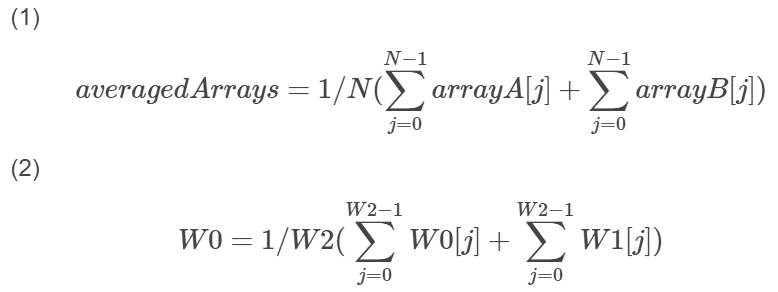
After that, we can right shift A by #6 which is the same thing as dividing by 64 and store that result in the W0 register.
e
Lastly, we save the 40-bit accumulator into 16-bit result averagedArrays. From the main.c file, we call the average function created in assembly and observe the following results:
int main (void){ while(1) { // clear arrays averagedArrays = 0; // load arrays with number + random noise for (i = 0; i <= (BUFFER_SIZE-1); i++) { arrayA[i] = 0x0100 + (rand() & 0x001F); arrayB[i] = 0x0040 + (rand() & 0x000F); } // Exercise 1: sum the arrays and find the average averagedArrays = average(arrayA, arrayB, BUFFER_SIZE); }}Results
To be able to see the results of this lab you will have to follow these steps:
Open the Watches Window
After starting the debug session and halting it , you will have to open the Watches window by going to Window > Debugging > Watches or by pressing Alt+Shift+2.
Inside the Watches window double click on where it says <Enter new watch>, type in arrayA and hit Enter. This will add arrayA to our list of Watches. Do the same thing for arrayB and averagedArrays.

Place a breakpoint on line 20 in the main.c file. To set a breakpoint all you have to do is click on the line number where you wish to place the breakpoint.

 button to continue running the debug session. You will notice the program will stop at line 20. At this point, the averagedArrays watch will display the final result. You can also click on the plus signs next to arrayA and arrayB to see all their elements. (Keep in mind results will be different every time since we are using the rand function.)